
Job Aide for Merging two Patients in mTilda (Continue where I left off)
After confirming the merge of the two Patients by Supervisor selected, these are the next steps.
The required data to run the procedure is:
- Patient_to_DELETE: The patient that you do not want to retain.
- MERGE_into_Patient: The patient that you do wish to retain.
- User: Person performing the merge or CLINIM-IT.
To merge two patients within the mTilda database
Step 1: Connect to PCLINIMDB984
- Connect to the database using SQL Server Management Studio (SSMS).
Step 2: Expand the mTilda database object

Step 3: Expand Programability and Stored Procedures
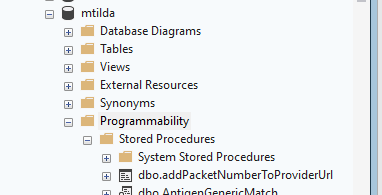
Step 4: Navigate to dbo.mtr_Merge_patients
- The list should be alphabetical
Step 5: Right-click to execute the stored procedure
- Follow the stored procedure prompts
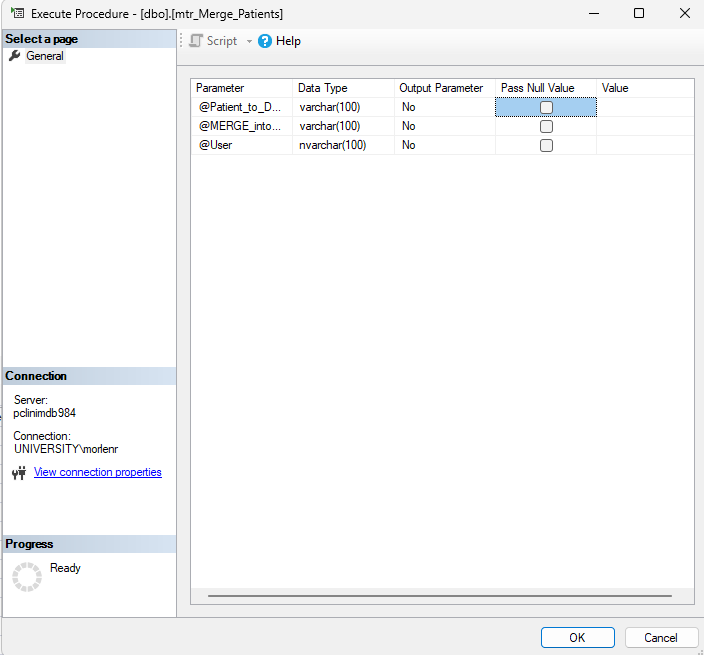
- Patient_to_DELETE: The patient that you do not want to retain.
- MERGE_into_Patient: The patient that you do wish to retain.
- User: Person performing the merge or CLINIM-IT.
Step 6: Completion of updates
- After the procedure runs it will display all updates made within the previous 5 minutes.
- Updates are audited and tracked on the table PatientNumberUpdateAudit within the mTilda database.
- Patients whose data is to be deleted have their demographic information retained on the Deteled_Merged_Patients table for reference.