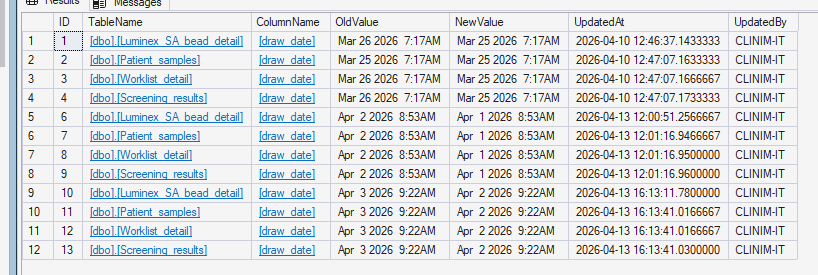
Within the mTilda database there are several helpful stored procedures for general maintenance. One such stored procedure is the dbo.mtr_mTilda_Update_DateTime procedure that can be used to systematically update all instances of a datetime for a SAMPLE.
The required data to run the procedure is:
- New_DateTime -- the value that you want the sample to be updated to
- Field_To_UPDATE-- the filed that you wish to update (draw_date, create_date, modify_date, etc).
- Sample_Number_To_UPDATE -- The mTilda sample_number that you wish to perform the update on.
- Username-- CLINIM-IT or your Clinimmune initials.
To update the datetime of a sample within mTilda
Step 1: Connect to PCLINIMDB984
- Connect to the database using SQL Server Management Studio (SSMS).
Step 2: Expand the mTilda database object

Step 3: Expand Programability and Stored Procedures
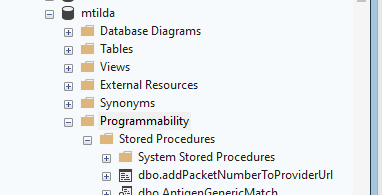
Step 4: Navigate to dbo.mtr_mTilda_Update_DateTime
- The list should be alphabetical
Step 5: Right-click to execute the stored procedure

- Follow the stored procedure prompts
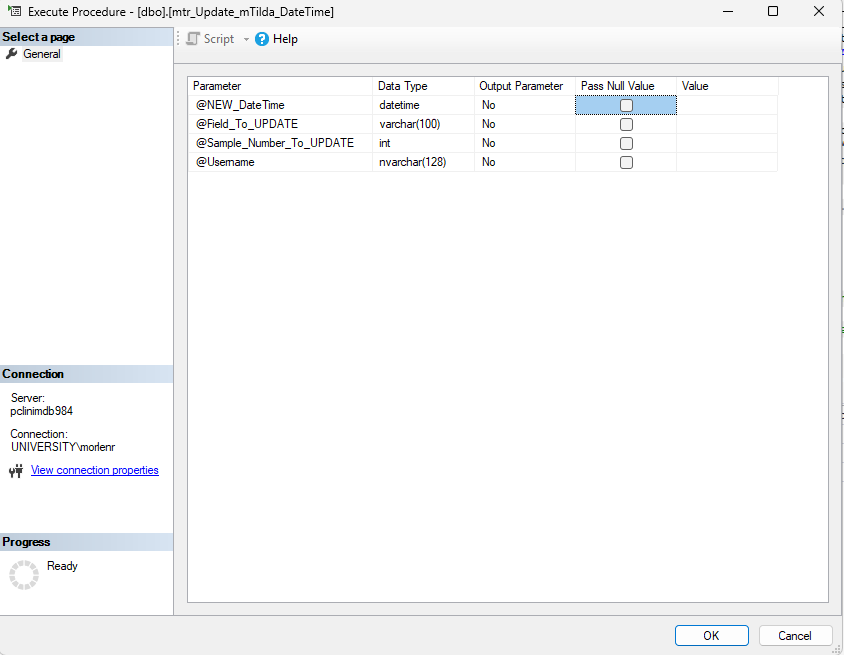 New_DateTime -- the value that you want the sample to be updated to
- Field_To_UPDATE-- the filed that you wish to update (draw_date, create_date, modify_date, etc).
- Sample_Number_To_UPDATE -- The mTilda sample_number that you wish to perform the update on.
- Username-- CLINIM-IT or your Clinimmune initials.
- The stored procedure will run for ~20-30 seconds as it finds all instances to update across all tables in the database.
Step 6: Completion of updates
- After the procedure runs it will display all updates made within the previous 5 minutes.
- Updates are audited and tracked on the table DateTimeAuditUpdate within the mTilda database.
- The table, field, previous value, new value, when the update occurred, and by whom are tracked.
- Updates are audited and tracked on the table DateTimeAuditUpdate within the mTilda database.